
The short answer: yes — AT&T Internet Air for Business works well as a backup internet connection, but only when it is wired into a dual-WAN failover router that can detect an outage and switch over automatically. Internet Air gives your business a completely separate connection path — cellular 5G instead of your wired line — which is exactly what you want from internet backup failover: if a construction crew cuts the cable on your street, a second wired line in the same trench often goes down with it, while a cellular connection keeps working. The trade-off is that Air is a wireless path with typical speeds around 225 Mbps and, on the Standard plan, no priority data guarantee during congestion, so it is a backup line, not a second primary.
There is one more thing to know before you spend anything: if your business already has AT&T Business Fiber at 1 Gig or faster, your gateway likely includes built-in 5G backup at no extra cost, with automatic failover and recovery. For those businesses, Internet Air as backup is a second layer of protection rather than the first. This guide walks through how internet backup failover actually works, how to set up Internet Air as backup internet with a dual-WAN router, what it costs, what it cannot do, and how to test it so it works when it matters.
Get Internet Air as your business internet backup
Add a cellular failover path to your office — plans from $65/mo list ($60 with AutoPay and paperless billing).
How internet backup failover protects a small business
Internet backup failover keeps a second internet connection on standby so your business stays online when the primary line drops. It has three parts: a primary connection (usually fiber or cable), a backup connection on a different path (such as Internet Air over cellular), and a router that watches the primary and switches traffic to the backup automatically.
That automatic switch is the whole point. Manual failover — someone noticing the outage and reconnecting everything by hand — takes tens of minutes at best and fails entirely overnight or when the owner is away. A dual-WAN failover router health-checks the primary every few seconds; when it stops answering for a defined number of checks, the router moves office traffic to the second WAN port, and fails back once the primary proves stable again.
What keeps running during business internet failover depends on your applications. Email, cloud point-of-sale, web browsing, and VoIP generally recover within seconds to a minute — calls in progress will drop, but new calls work immediately. VPN tunnels and remote-desktop sessions may need to reconnect, and services that whitelist your office IP will see traffic arriving from the backup connection’s different address. If your payment processor or a vendor portal restricts access by IP, document the backup path with them in advance.
Why Internet Air makes sense as a backup internet connection for business
Internet Air fits the backup role for three reasons: it is path-diverse, it is fast enough for backup duty, and it is simple to deploy. Path diversity is the most important. Most internet outages that hit small businesses are local physical problems — a cut fiber line, a damaged cable drop, a failed piece of neighborhood equipment, or a planned maintenance window. A second wired connection often shares the same street trench, the same utility pole, or the same provider network, which means one backhoe can take out both. Internet Air rides the AT&T cellular network instead, so the failure modes of your primary line and your backup line barely overlap.
Speed is the second reason. Internet Air for Business delivers typical speeds around 225 Mbps, with no speed caps, no data caps, and no overage fees. That is more than enough to keep a small office productive during an outage: cloud POS keeps ringing up sales, email flows, VoIP works. It is not fiber-class performance — the Premium plan includes 250 GB of Turbo priority data per cycle and may slow during busy times after that — but backup duty is about continuity, not peak performance. For more on the service day to day, see our AT&T Internet Air for Business overview.
The third reason is deployment simplicity. The Internet Air 5G Gateway is self-contained: place it near a window, plug it in, wait up to three minutes, and it is online. For failover use you will not even rely on its Wi-Fi — you run an Ethernet cable from one of the gateway’s LAN ports into the second WAN port of your failover router, so the gateway can sit wherever the cellular signal is strongest while your router stays with the rest of your network gear. Just remember the service rule: fixed wireless must stay at the qualified business address on your account.
There is also a cost argument. A second wired business line means a second installation, a second monthly bill at full business rates, and sometimes a construction charge. Internet Air installs in minutes with no technician visit in most cases, at straightforward pricing (see below). For businesses whose primary line is already solid and who want affordable insurance rather than a second premium line, that math is compelling.
Internet Air backup vs the built-in 5G backup on 1 Gig+ fiber plans
Before buying anything, check what you already have. AT&T Business Fiber plans at 1 Gig and above include built-in 5G backup at no extra cost: the fiber gateway itself carries a cellular radio, and when the fiber line drops, the gateway fails over to cellular automatically and recovers automatically when fiber returns. It is a single-box solution with nothing to wire and nothing extra to pay for.
So when does Internet Air as backup still make sense for a fiber customer? The built-in backup has one hard limitation: it dies in a power outage unless the gateway is on an uninterruptible power supply (UPS) — the cellular radio lives inside the gateway, so no power means no backup. A UPS solves that, and every business with 1 Gig+ fiber should have one regardless. Beyond that, adding Air is a second, fully independent layer — reasonable if you want belt-and-suspenders protection, but weigh it against simply putting a good UPS on the existing gateway.
For businesses on fiber tiers below 1 Gig, or on cable or DSL from another provider, the built-in backup is not on the table, and Internet Air becomes the primary backup candidate. The comparison below summarizes the options:
| Backup option | Failover | Extra monthly cost | Power-outage behavior | Best for |
|---|---|---|---|---|
| Built-in 5G backup (1 Gig+ AT&T fiber) | Automatic, single box | None | Fails without a UPS | Fiber 1 Gig+ customers wanting free automatic protection |
| Internet Air as backup via dual-WAN router | Automatic via router | Air plan rate | Survives if gateway and router are on UPS | Any business wanting path-diverse cellular backup |
| Second wired line via dual-WAN router | Automatic via router | Second full business line | Survives if equipment is on UPS | Businesses where downtime is very expensive |
| Phone hotspots (manual) | Manual | None extra | Works while phones have charge | Emergency stopgap only, not a plan |
If you are weighing a wired second line against a wireless one, our wired vs wireless backup internet comparison breaks down the trade-offs in more detail.
How to set up Internet Air as backup internet with a dual-WAN failover router
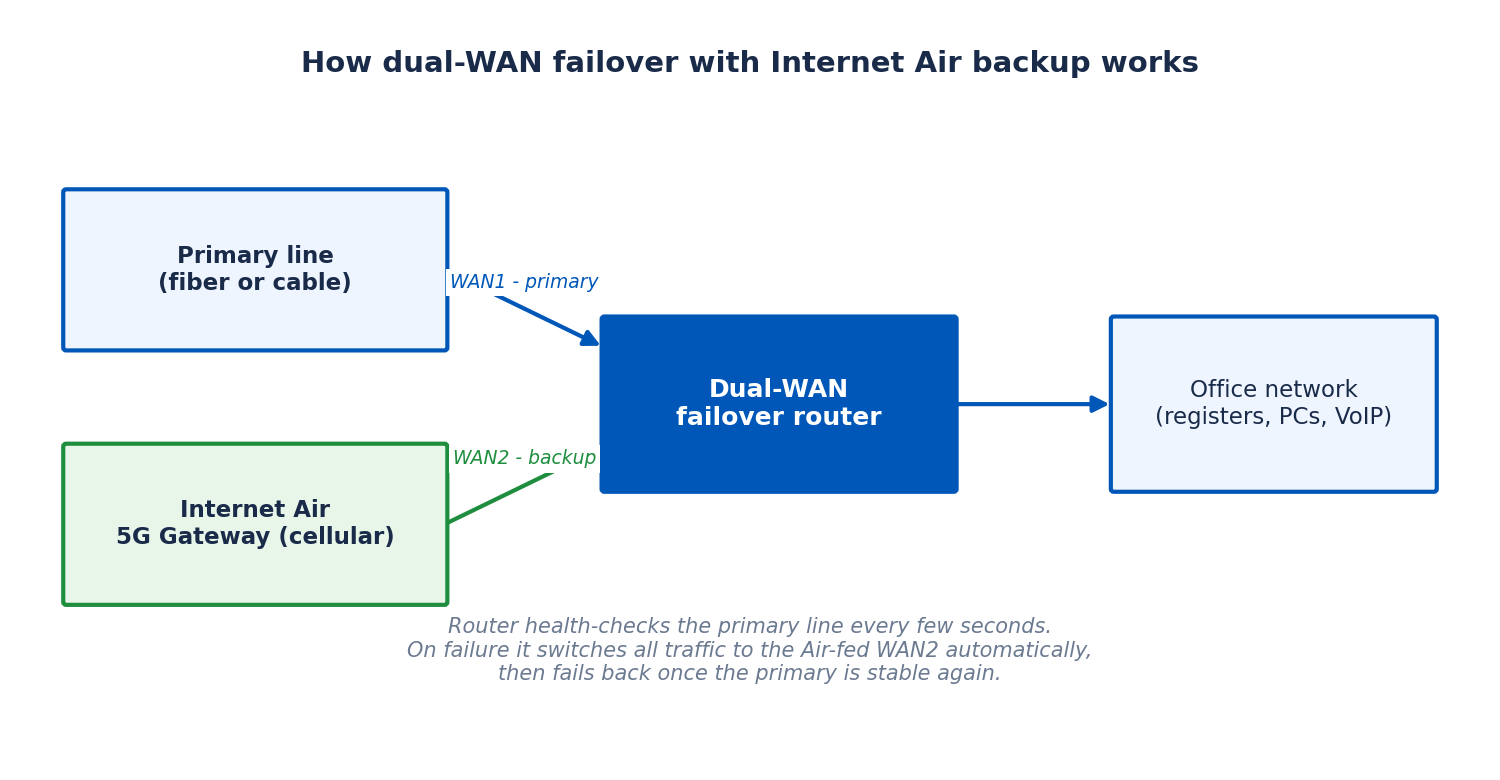
This is the core of the project. The Internet Air gateway does not, by itself, perform failover for your office network — its job in this design is simply to be a reliable cellular internet source. The dual-WAN router is the brains: it holds your office network together, watches the primary connection, and switches everything to the Air-fed WAN port when the primary fails. Here is how to put it together.
What you need for dual-WAN internet backup failover
You need four things: your existing primary connection, an active Internet Air line with its 5G Gateway, a dual-WAN (failover) router, and Ethernet cables. You do not need enterprise gear — many small-business routers include dual-WAN failover as standard — but confirm the spec sheet says “failover” or “WAN backup” specifically. Some budget routers only do load balancing, which splits traffic across both lines rather than holding one in reserve.
Plan the layout before buying. The Internet Air gateway needs the best cellular signal you can give it: elevated, near a window on an exterior wall, away from metal shelving, thick concrete, and large appliances. Use the 4G/5G LEDs to compare spots — solid green is strong, solid blue is fair, solid red is weak. A single Ethernet cable (Cat5e or better, up to 100 meters) connects the gateway to the router, so the two can be rooms apart.
Budget for a UPS if you do not have one — a failover setup that dies on the first power blip is half a solution. Put the gateway, the router, and your network switch on it, sized for at least 15–30 minutes so brief outages ride through cleanly.
Step-by-step: connecting the Internet Air gateway to your dual-WAN failover router
Step 1 — Activate and place the Internet Air gateway first, on its own. Activate the service, place the gateway at the chosen signal-strong spot, plug in power, and wait up to three minutes. Confirm the 4G/5G LEDs show green or blue, then run a speed test from a laptop on the gateway’s Wi-Fi to record a baseline. Do not skip this: confirm the backup line works before it is buried behind the router.
Step 2 — Wire the gateway to the router’s second WAN port. Run an Ethernet cable from any of the gateway’s LAN ports to the WAN2 port on your dual-WAN router. Leave your primary connection on WAN1 exactly as it is today.
Step 3 — Configure WAN2 in the router’s admin interface. Set WAN2 to automatic/DHCP addressing — the gateway hands an address to whatever is plugged into it. Designate WAN1 as primary and WAN2 as backup. Menu names differ by router; follow your router’s manual — the concept is universal.
Step 4 — Set the health-check and failover timing. Configure the health check on the primary WAN — typically a ping or DNS check every 5–30 seconds, with failover after 3–5 consecutive failures. Do not trigger on a single missed ping; brief hiccups happen. Set failback to require several minutes of stable primary connectivity before switching back, and enable failover notifications (email or app alert) if the router supports them.
Step 5 — Decide the gateway’s Wi-Fi role. Once the gateway feeds the router over Ethernet, its own Wi-Fi is redundant — office devices should stay on the router’s network so failover is seamless. Leave the gateway’s Wi-Fi on as an emergency fallback (with its default password changed) or turn it off in the web admin portal to reduce interference.
Step 6 — Test before you depend on it. Unplug the primary line’s cable from WAN1 and watch the router move traffic to WAN2. From an office computer, confirm browsing, email, and a test transaction work. Restore the primary and confirm clean failback. Troubleshoot now — not during a real outage — and re-test quarterly (checklist below).
Dual-WAN failover router settings to configure for business internet failover
Beyond the basic primary/backup designation, a few settings separate a setup that works from one that works well. First, QoS or traffic prioritization on the backup path: during an outage, card payments, VoIP, and email should get first claim on the Air connection’s bandwidth, with large cloud backups and software updates deprioritized or paused. Second, handle the IP-address change: when failover kicks in, your office’s public IP changes, so if you run a VPN server, IP-whitelisted services, or remote access tied to the primary IP, document what breaks — for example, a dynamic-DNS hostname that updates on failover, or a procedure for updating the whitelisted IP with your payment processor.
Finally, keep the router’s firmware current — most small-business routers update automatically or with a one-click check. Never flash firmware from unofficial sources; a compromised router sees every byte your business sends. If the router supports usage tracking per WAN, watch how much traffic the backup path carries: a backup WAN mysteriously carrying traffic every Tuesday afternoon is telling you something about the primary line.
What downtime costs: a backup internet sizing example for small business
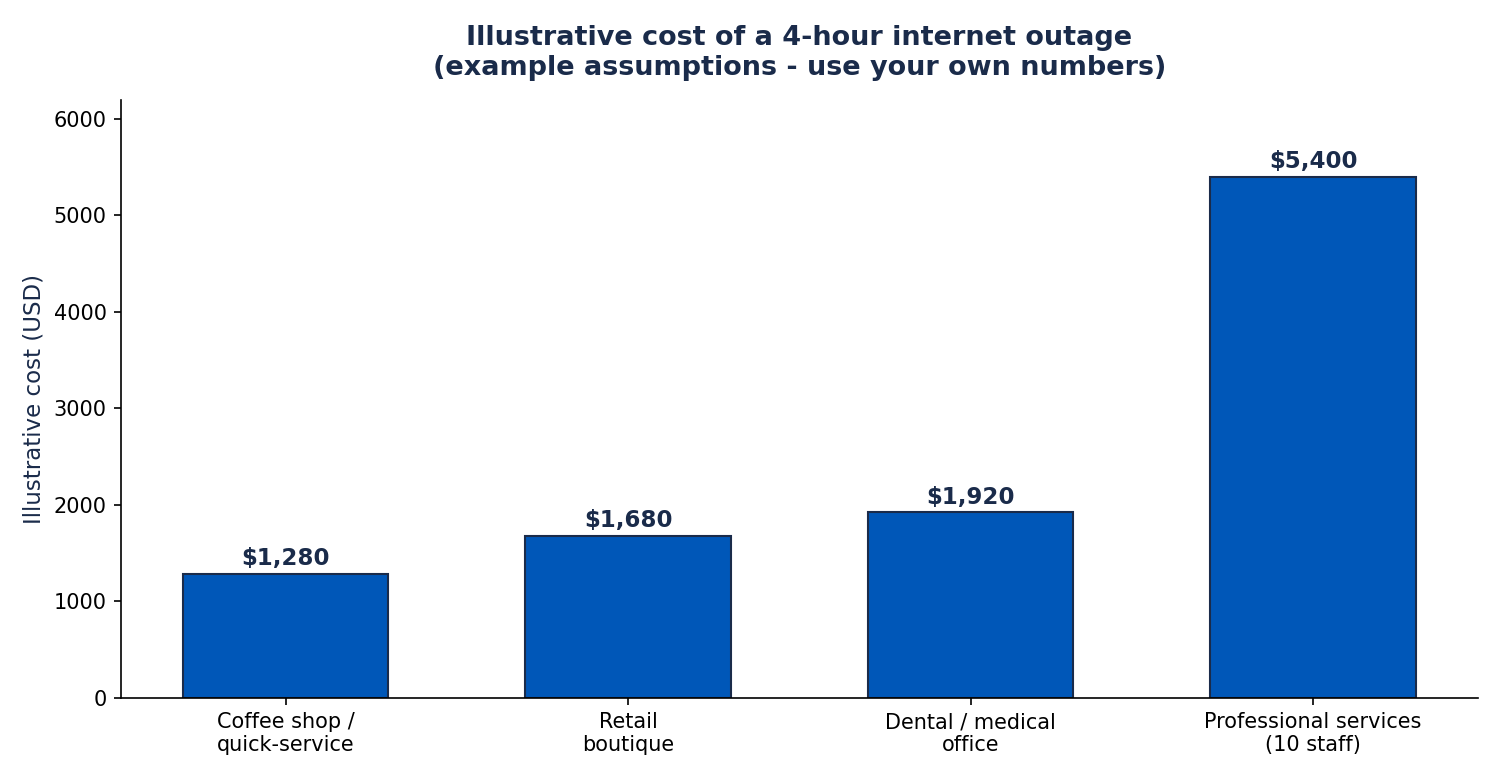
Backup internet is insurance, and insurance decisions need numbers. The table below is an illustrative example — not a study, and not your business — showing how to think about what an outage costs per hour. Replace these assumptions with your own figures: average revenue per hour, how much of it depends on connectivity (card payments, online orders, cloud tools), wages paid to idle staff, and any contractual penalties or spoilage.
| Business type | Illustrative revenue/hour | Share dependent on internet | Illustrative cost of 4-hour outage |
|---|---|---|---|
| Coffee shop / quick-service restaurant | $400 | ~80% (card payments, online orders) | ~$1,280 |
| Retail boutique | $600 | ~70% (POS, inventory lookup) | ~$1,680 |
| Dental / medical office | $800 | ~60% (scheduling, records, phones) | ~$1,920 |
| Professional services office (10 staff) | $1,500 | ~90% (cloud apps, email, VoIP) | ~$5,400 |
The math that matters is the comparison: one prevented four-hour outage per year against the annual cost of the backup line. Internet Air Standard runs $65 per month list ($60 with AutoPay and paperless billing) — $780 per year list. If a single half-day outage would cost your business more than that — and for most businesses it would — the backup line pays for itself the first time it earns its keep. Be honest about frequency, though: if your primary line has been rock-solid for three years, you are buying peace of mind, which is legitimate — just do not oversize the solution.
There is a second, subtler return: backup converts unschedulable outages into brief automatic switchovers. A planned maintenance window is an inconvenience you can plan for; a cut line at 11 a.m. on your busiest Saturday is not. For the broader telecom budget picture, our business internet and phone bundle savings guide shows how the backup line fits overall costs.
Disclaimer: This article contains affiliate links to AT&T Business services. We may earn a commission if you purchase through them, at no extra cost to you. Ortelcom.com is an independent publisher and is not affiliated with or endorsed by AT&T. Pricing, speeds, and availability are not guaranteed, were checked in October 2026, and vary by address and promotions — please confirm all details before ordering. AT&T and all related marks are trademarks of their respective owners.
Limitations of Internet Air as a backup internet path
An honest backup plan accounts for what the backup cannot do. First, Internet Air is a cellular connection, which means it shares the realities of all wireless service: speeds vary with tower congestion, signal strength, and time of day. The typical ~225 Mbps figure is a typical figure, not a floor. During a widespread local emergency — the exact scenario where everyone reaches for their phones at once — cellular networks congest, and your backup slows down along with everything else. For the common case (a cut line, a failed modem, planned maintenance), congestion is not an issue. For the rare catastrophe case, no single backup path of any kind is a complete answer.
Second, understand the priority-data structure. The Premium plan includes 250 GB of Turbo priority data per billing cycle, after which speeds may slow during busy times; the Standard plan carries no stated priority bucket. If your failover events are brief — hours, not weeks — you will rarely approach these limits, and with no data caps or overage fees a backup-only Air line can carry a small office through a multi-day outage. The constraint to watch on very long outages is congestion priority, not data volume.
Third, the address lock. Internet Air is fixed wireless: it must be used at the qualified business address on the account. You cannot move the gateway to a second location, a job site, or a trade-show booth as backup — each location that needs backup needs its own line. Fourth, placement matters more than for a wired line. A gateway stuffed in a back closet behind metal shelving delivers a fraction of the speed it would near a window — and since this is your backup, that reduced speed is what you get exactly when you need it most.
Fifth — and this is the key framing — do not treat Internet Air as a replacement for a second wired path when downtime is genuinely expensive. If an hour offline costs you five figures, you want a second wired connection from a different provider on a different physical path, professionally monitored, with an SLA. Internet Air is excellent affordable insurance for the broad middle of small businesses; it is not enterprise-grade redundancy. If your primary is AT&T fiber at 1 Gig or faster, remember that AT&T Business Fiber already includes automatic 5G backup — evaluate that free layer before adding a paid one.
A final practical note: voice calls in progress drop at the moment of switchover and must be re-placed, and VPN tunnels may need to reconnect — true of virtually all failover setups. Test these specific applications during your quarterly failover test so there are no surprises.
Quarterly failover testing: proving your business internet failover works
A backup connection you have never tested is a hope, not a plan. Equipment gets unplugged, settings get changed, passwords expire, and the Air gateway’s signal environment changes when the warehouse next door puts up new metal racking. Test failover quarterly — put it on the calendar like a fire drill — and run through this checklist each time:
- Schedule the test for a low-impact window and tell staff it is happening, so a brief blip does not cause panic.
- Record baselines first: note the gateway’s 4G/5G LED color, run a speed test through the backup path directly, and confirm the router’s admin interface shows both WANs healthy.
- Simulate the outage by disconnecting the primary line from the router’s WAN1 (physically unplugging is the most honest test — it mimics a real failure better than a software disable).
- Time the switchover and confirm office devices reach the internet, send/receive email, and process a test card transaction.
- Test the applications that matter: place a VoIP call, connect the VPN, open the cloud tools the business runs on. Note anything that needs manual reconnection.
- Restore the primary and confirm failback happens cleanly after the configured stability period.
- Check the logs on the router for the failover event, and confirm any email/app alerts fired.
- Document the result — date, tester, switchover time, anything that behaved unexpectedly — and fix issues before the next quarter.
One more rule: when you first install the backup line, keep the old connection (if you are replacing anything) until the new setup passes its checks. Overlap the services for at least one full quarterly test cycle so you are never without a proven fallback. If a test reveals degraded Air signal — new construction, a moved gateway, seasonal foliage on the tower path — re-run the placement process with the 4G/5G LEDs and relocate the gateway. Backup performance is set by the worst day, not installation day.
Internet Air pricing for business backup internet (checked October 2026)
Pricing below is AT&T’s official list pricing as checked in October 2026; availability and promotions vary by address, so confirm before ordering. There are two plans, and for backup duty the choice usually comes down to whether the priority-data bucket matters to you:
| Plan | Monthly list price | With AutoPay + paperless billing | With eligible business wireless | Priority data |
|---|---|---|---|---|
| Internet Air Standard | $65 | $60 | $40 | Not stated; may slow when network is busy |
| Internet Air Premium | $105 | $100 | $80 | 250 GB Turbo priority per cycle, then may slow when busy |
For most backup-only use, Standard is the rational pick: the backup line sits idle nearly all the time, and when it is active, any working connection beats none. Premium earns its extra $40 per month if your primary outages tend to be long or the backup doubles as overflow capacity. If your business also uses AT&T business wireless lines, bundled pricing — $40 or $80 per month — makes the decision easier. Taxes, fees, and equipment charges may apply on top of the plan rate; confirm the full monthly total for your address when ordering.
Check Internet Air availability for your business address — confirm pricing and that your location qualifies for the service before you buy the failover router.
Internet Air backup failover: frequently asked questions
Can Internet Air be used as a backup internet connection for a small business?
Yes. Connect the Internet Air 5G Gateway’s Ethernet LAN port to the second WAN port of a dual-WAN failover router, designate it as the backup path, and the router will switch your office to the cellular connection automatically when the primary line fails. This is the standard, supported way to use Air as backup internet — the gateway just needs to stay at the qualified business address on your account.
Does business internet failover with Internet Air require a special router?
You need a router with dual-WAN automatic failover — one WAN port for the primary line and a second for the Internet Air gateway. Many small-business routers include this; confirm the spec sheet says “failover” or “WAN backup,” not just load balancing. The Internet Air gateway itself does not perform failover for your office network in this design; the router does.
How fast is the Internet Air backup connection during business internet failover?
Typical speeds are around 225 Mbps, with no data caps or overage fees. That comfortably covers cloud POS, email, VoIP, and general office work during an outage. Actual speed depends on signal strength and tower congestion at the time — place the gateway where its 4G/5G LEDs show green (strong) or blue (fair) for the best result.
Is Internet Air backup better than a second wired line for business internet failover?
It is more path-diverse and much cheaper to install, which makes it the better pick for most small businesses. A second wired line is the better pick when downtime is extremely expensive, because wired performance is more consistent and can come with a service-level agreement. They are different tools: Air is affordable insurance; a second wired line is premium redundancy.
What happens to my business internet failover during a power outage?
The failover setup only survives a power outage if the equipment has power. Put the Internet Air gateway, the dual-WAN router, and your network switch on a UPS (uninterruptible power supply) sized for at least 15–30 minutes. Note that AT&T’s built-in 5G backup on 1 Gig+ fiber plans has the same requirement — without a UPS, the gateway dies with the power.
How often should I test my internet backup failover setup?
Quarterly. Unplug the primary line from the router, time the switchover, verify email, transactions, VoIP, and VPN all work on the backup path, then restore and confirm failback. Document each test. And when you first install the backup line, keep any existing backup until the new setup passes its checks.

