
Questions to ask business internet sales rep conversations should come before you sign anything, not after the first bill arrives. A sales call can move quickly, with speed numbers, bundle offers, and time-limited language that make it hard to compare one quote with another. If you walk in with a clear checklist, you can slow the conversation down, get the important details in writing, and leave with a quote you can actually compare.
This printable checklist is built for US small-business owners who do not want to become network experts just to buy internet. It covers speed and capacity, pricing and contract terms, equipment and coverage, installation and support, and the questions that reveal hidden costs or limits. Print it, tick off each answer as you go, and do not treat anything as confirmed until it appears on your written quote.
Compare AT&T Business Fiber before you decide
Use this checklist alongside a Fiber quote to confirm speed, pricing, and availability for your address.
How to Use This Business Internet Sales Rep Checklist
Use this checklist as a working document, not as a script you must read word for word. Start with the sections that matter most to your business, such as pricing if you have a strict budget, or coverage if your office has tricky rooms, and work through the rest before you agree to anything. Write the rep’s answers beside each question, note the date of the call, and ask for the same answers in writing on your quote, because a verbal assurance is much harder to rely on later.
It also helps to prepare a short brief about your business before the call. Note your team size, the number of devices, the tools you use most, your busiest hour, and any plans to hire, move, or add a location. That brief lets the rep answer in terms of your actual work, rather than a generic package, and it makes it easier to spot when a recommendation does not fit your peak use. Keep the brief with the checklist so future calls start from the same facts.
Finally, use the same checklist for every provider or quote you consider. When each rep answers the same questions, comparison becomes far easier, and gaps become obvious. If one quote leaves several checklist items blank, that is useful information in itself, and it is a reason to ask follow-up questions before deciding, rather than assuming the missing details are favourable.
Business Internet Sales Rep Questions About Speed and Capacity

Speed questions should go beyond the largest number on the page. Ask what the quoted tier is, what it means in practical terms for your team, and how it handles your busiest hour, when video calls, uploads, and customer systems overlap. Ask whether the tier is shared or dedicated in the way the rep describes it, and ask what happens to performance when many devices are connected at once. A clear, plain-language answer here is a good sign, while vague reassurance is a reason to ask again.
Also ask about uploads, not just downloads. Many business tasks, such as video calls, cloud backups, and sending large files, depend heavily on upload performance, and a plan that feels fast for browsing can still struggle when uploads peak. Ask how the tier handles simultaneous uploads, whether there are any usage limits or fair-use conditions to confirm, and what you should do if performance drops during peak hours. Those questions turn a headline speed into a working picture.
Before the call, think through your device load as well, because devices add up faster than headcount alone suggests. Laptops, phones, printers, scanners, card readers, cameras, and guest devices can all compete for the same connection. For a structured comparison, see this guide on how to compare business internet quotes, which helps you line up speed, equipment, and terms side by side instead of comparing a headline from one quote with a price from another.
Internet Sales Checklist Questions About Pricing and What Is Included
Pricing questions are where a checklist earns its keep, because the monthly headline is rarely the whole story. Ask what the quoted monthly price includes and what, if anything, is charged separately, such as equipment, installation, or additional services. Ask how long the quoted price applies, what it changes to afterwards, and whether taxes or other items are included in the figure you were given. Ask for a breakdown in writing, so you can compare the full monthly picture, not just the first number you heard.
For reference, when comparing AT&T Business Fiber, the list prices to confirm on your own quote are 300 Mbps at $60 per month, 500 Mbps at $100 per month, 1 GIG at $140 per month, 2 GIG at $185 per month, and 5 GIG at $285 per month, with lower prices with an eligible wireless plan at $40, $60, $90, $135, and $235 per month respectively. Confirm whether those prices apply at your address, what is included, and whether any promotion or condition changes them, because pricing, speeds, and availability vary by address and promotions and are not guaranteed here.
Also ask about promotions in careful terms. Ask what a promotion requires, how long it lasts, what happens when it ends, and whether accepting it affects your ability to change tiers, move, or end service. A promotion can be useful, but only if you understand its conditions and its end date. Note the answers beside the price on your checklist, so the promotion and the regular price are never confused later.
Business Internet Quote Questions About Contract Terms
Contract questions are often skipped because they feel awkward, but they protect you more than almost any other section. Ask how long the term is, what happens at the end of the term, and whether the service renews automatically and on what terms. Ask what changing tiers would involve during the term, what moving premises would involve, and what, if any, charges could apply for ending service early. Ask for each answer in writing, and do not assume that a friendly verbal summary covers the full terms.
Also ask about price changes during the term. Ask whether the monthly price can change, under what conditions, and how you would be told. Ask whether any part of the service is on a separate term from the main connection, such as equipment or an add-on, because separate terms can create surprises when you try to change one part. If an answer is unclear, ask the rep to point to where it appears in the written terms, rather than accepting a summary alone.
A simple buying checklist can help you keep these contract points together with the rest of your decision. See this business internet buying checklist for a broader pre-purchase structure, and use it alongside this sales rep checklist so pricing, contract, equipment, and support questions are all covered before you sign. The two checklists overlap deliberately, because the same detail can matter in more than one place.
Sales Rep Checklist Questions About Equipment and Coverage
Equipment and coverage questions matter because a fast connection with weak Wi-Fi in the rooms where people work will still feel slow. Ask what equipment is included, whether it is rented or purchased, what happens if it fails, and whether you can use your own equipment instead. Ask how Wi-Fi coverage is handled across your space, including meeting rooms, back rooms, and any areas with thick walls or interference, and ask what options exist if a dead spot appears after installation.
Also ask about devices and guest access. Ask how many devices the setup is intended to support in practical terms, how guest access would be kept separate from your main business traffic, and what you should do when adding new devices or new staff. Ask who can manage basic settings, such as Wi-Fi names and passwords, and whether there is a simple guide for a non-specialist on your team. A setup that only one expert can manage will cause problems when that person is away.
Test coverage in your own space once a setup is in place, rather than assuming a single router position will suit every room. Walk through the rooms where people actually work and meet, try a video call from each spot, and note any weak areas early, while they are still easy to raise. Equipment and coverage are part of the service you are buying, not an afterthought, so treat them as checklist items with the same weight as speed and price.
Questions Before Buying Business Internet About Installation
Installation questions should be asked early, because installation is often where expectations and reality diverge. Ask what installation involves, who needs to be on site, and what access or preparation is needed from you. Ask what could delay installation, such as building access, wiring, or availability at your address, and ask how you will be kept informed if the date changes. Frame these as questions to ask and confirm, never as guarantees, because installation steps and timing can vary by address and building.
Also ask what happens on installation day itself. Ask whether there will be a period without service during a changeover, what equipment will be installed and where, and what checks will be done before the installer leaves. Ask what to do if something does not work after installation, and who to contact first. A short written summary of these steps, kept with your checklist, can save a lot of confusion on the day.
If you are switching from another provider, ask about the changeover in particular. Ask how the old and new services overlap, if at all, what you should do with old equipment, and what steps protect your team from a gap in service. Do not assume a seamless switch, and do not cancel an existing service until you have confirmed the new service is working and you understand the changeover steps in writing.
Disclaimer: This article contains affiliate links to AT&T Business services. We may earn a commission if you purchase through them, at no extra cost to you. Ortelcom.com is an independent publisher and is not affiliated with or endorsed by AT&T. Pricing, speeds, and availability are not guaranteed, were checked 2 November 2026, and vary by address and promotions — please confirm all details before ordering. AT&T and all related marks are trademarks of their respective owners.
Business Internet Contract Questions About Support and Service Levels
Support questions are easy to postpone until you need support, which is exactly when they matter most. Ask how to report a problem, what hours support is available, and what information support will need from you, such as an account detail or a simple test result. Ask what steps you can take first, such as checking equipment or testing from a wired connection, and ask how faults are prioritised if they affect customer-facing work. A simple, written support route is worth more than a vague promise of help.
Service level questions deserve the same care. Ask what service level, if any, applies to your plan, what it covers, and what it does not cover, and ask where it is written. For background on the concept, see this explainer on what an internet SLA is for business, which sets out the terms to look for and the questions to ask before assuming a service level covers your situation. Use it to frame your questions, and confirm the answers for your specific quote, because terms vary by plan and provider.
Also ask who on your team should be the contact for support, and whether more than one person can be authorised. If only one person can report a fault or approve a change, a holiday or a busy day can delay help. Agree a simple internal route as well: who notices a problem, who checks the basics, and who contacts support, so a fault is reported quickly and with the information support needs.
Compare Business Internet Quotes With This Checklist Table
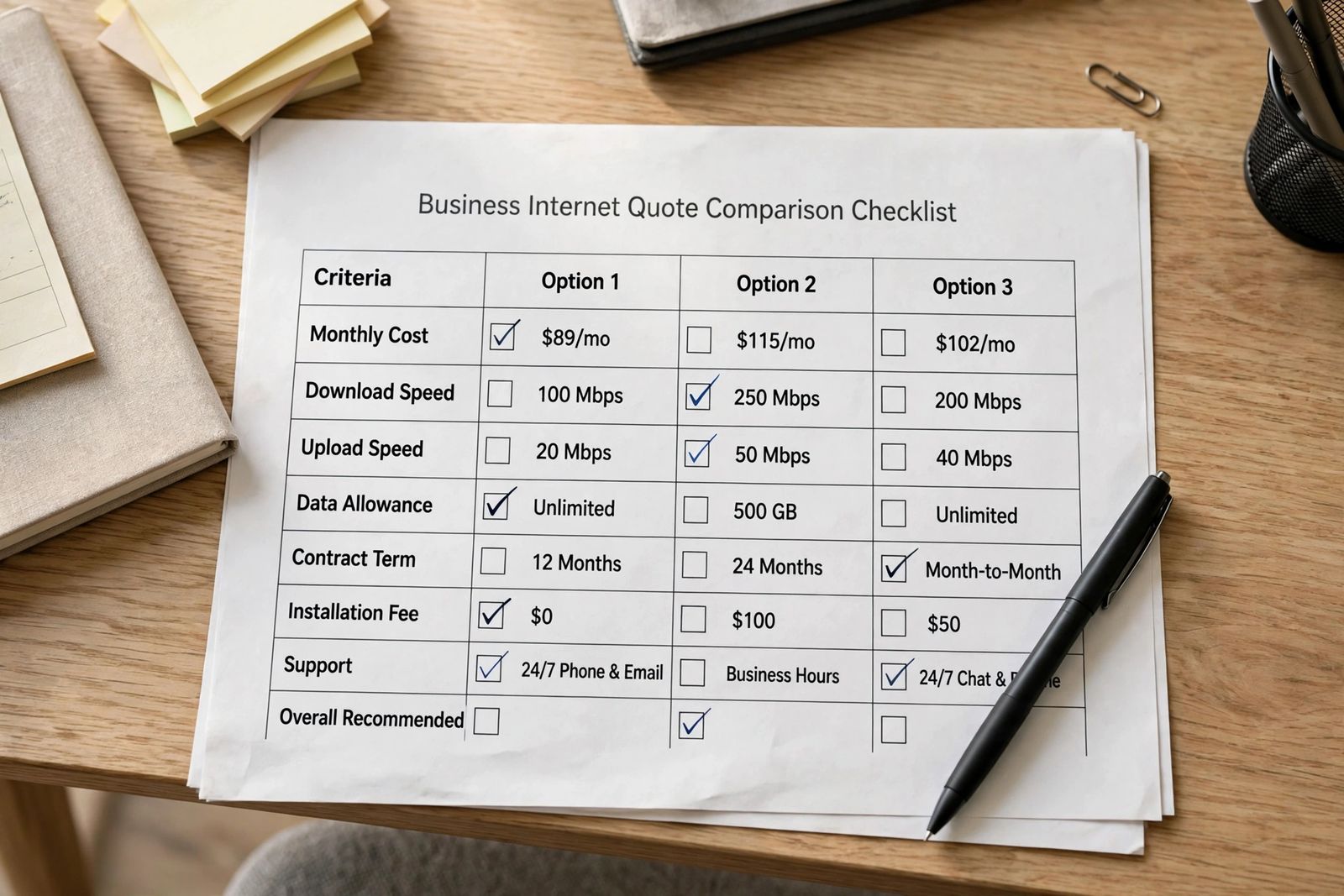
A table makes comparison concrete, because it forces each quote onto the same lines. Use the table below as a printable comparison sheet, and fill in one column per quote. If a rep cannot answer a row, leave it blank and follow up, rather than filling it with a guess. A blank row is a useful warning, not a detail to gloss over.
| Checklist item | Quote A | Quote B |
|---|---|---|
| Quoted tier and monthly price | ||
| What is included, and what is extra | ||
| Contract term and renewal terms | ||
| Equipment and coverage | ||
| Installation steps and changeover | ||
| Support route and service level | ||
| Upgrade, move, and early-exit terms |
Once the table is filled in, compare row by row, not quote by quote. A quote that looks cheaper on the first row may be more expensive once equipment, contract, and support rows are included, while a slightly higher monthly price may include coverage or support that the cheaper quote leaves out. That row-by-row comparison is the whole point of a checklist, and it is far more reliable than comparing headlines alone.
Keep the completed table with your signed terms, so you can check later whether the service you receive matches the quote you accepted. If a bill or a service detail differs from the table, you will have a clear, dated record to refer to, which makes any follow-up conversation much simpler. A checklist that is filed away after signing is still useful, because it becomes your reference for the life of the contract.
Business Internet Sales Rep Questions About Hidden Costs
Hidden costs rarely announce themselves as hidden costs. They appear as separate items, conditions, or steps that were not mentioned in the headline price. Ask directly whether there are any charges beyond the monthly price, including equipment, installation, changes, moves, or ending service early, and ask for each one to be listed on the quote. Ask whether taxes or other items are included in the quoted figure, and ask what could cause the monthly amount to change during the term.
Also ask about costs that are easy to overlook, such as additional equipment for coverage, charges for extra devices or users if any apply, and costs linked to a move or a tier change. Ask whether any service or add-on is included only for a limited period, and what it costs afterwards. For a fuller list of items to check, see this guide to hidden costs in business internet, and work through it alongside your checklist before signing.
Finally, ask what is not included, in plain terms. A rep who can explain exclusions clearly is easier to trust than one who only lists benefits, because every service has limits. Note the exclusions beside the price on your checklist, so they are part of your decision, not a surprise after installation. If an exclusion matters to your business, such as a need for coverage in a particular room, raise it now, while you can still compare alternatives.
Red Flags in a Business Internet Sales Rep Conversation
Some warning signs are worth noting, even when a rep is friendly and confident. Pressure to sign on the same call, reluctance to put key details in writing, vague answers about price changes or contract terms, and claims that sound like guarantees about speed, availability, or installation timing should all prompt you to slow down. A good rep should welcome written questions and a comparison period, because a clear quote stands up to comparison.
Another warning sign is a recommendation that does not fit your brief. If you described a small team with light use and were offered the largest tier without explanation, or if you described heavy peak use and were offered the smallest tier without discussion, ask why. Ask the rep to walk through your peak-hour picture and explain how the recommended tier handles it, and compare that explanation with your own notes. A recommendation should follow from your needs, not from a generic package.
If you feel rushed, it is reasonable to pause the conversation, complete the checklist, and return with follow-up questions. You do not need to decide on the first call, and a provider that cannot wait for a careful comparison is telling you something about the experience of dealing with them later. Take the time to compare, confirm, and decide on evidence, not on urgency alone.
Keep a simple note of any answer that felt vague, and follow up on it in writing before you decide. Vague answers are not always a problem, but they are the answers most likely to be remembered differently later, so a short email confirming what was said protects both sides. If a rep corrects or clarifies a point in writing, file that clarification with the quote, so the final terms you sign match the conversation you actually had.
FAQ: Business Internet Sales Rep Checklist Questions
What is the first question to ask a business internet sales rep?
Start with what the quoted tier means for your busiest hour, in plain language. Ask how it handles simultaneous video calls, uploads, and customer systems, and what equipment and coverage are included. That question quickly shows whether the recommendation is based on your actual work or on a generic package.
How do I compare business internet quotes fairly?
Use the same checklist for every quote, and compare row by row: tier, full monthly price, what is included, contract term, equipment, coverage, installation, support, and upgrade or exit terms. A quote that looks cheaper on one row may cost more once the other rows are included, so do not compare headlines alone.
What business internet contract questions matter most?
Ask about the term length, renewal terms, price changes during the term, tier-change and move terms, and any charges for ending service early. Ask for each answer in writing on your quote, and ask where it appears in the written terms if anything is unclear.
Should I ask about hidden costs before buying business internet?
Yes, ask directly whether there are charges beyond the monthly price, including equipment, installation, changes, moves, or early exit, and whether taxes are included. Ask what is not included and what could cause the monthly amount to change, and note the answers beside the price on your checklist.
Can I use this sales rep checklist for any provider?
Yes, the checklist is provider-neutral and works for any business internet quote. Use the same questions for each provider, keep the answers and the comparison table together, and only treat a detail as confirmed once it appears in writing on your quote.
Final Word: Use Your Business Internet Checklist Before You Sign
A checklist does not make buying business internet complicated. It makes it calmer, because it replaces pressure and guesswork with a short set of questions you can work through at your own pace. Print it, prepare your brief, ask for written answers, compare row by row, and pause if anything feels rushed or unclear. The few extra minutes spent on those steps can save months of frustration with the wrong tier, the wrong terms, or a surprise on the bill.
When you are ready to put the checklist to work, compare AT&T Business Fiber plans with this sales rep checklist in hand, and confirm speed, pricing, availability, and contract terms for your address before ordering. Bring your peak-hour notes, your comparison table, and your follow-up questions to the conversation, so the decision you make is one you can explain, defend, and live with.

