
When you compare AT&T business products side by side, the choice is rarely about finding one winner. Fiber, Internet Air, and Business Wireless solve different problems, and many small businesses end up using more than one of them for different jobs. Fiber usually anchors the office, Internet Air can get a location online quickly or serve as a backup, and Wireless keeps people connected when they leave the building. Understanding what each product is for makes the comparison much simpler.
This guide puts AT&T business products compared in one place: what each option does best, how its speed approach works, what setup looks like, and how it fits into a backup plan. It also includes a clear comparison table, a look at pricing on the published list figures, and practical questions to ask before you order. Use it to narrow your shortlist, then confirm availability, speeds, and pricing for your exact address and lines before you commit.
Compare AT&T Business Fiber First for Your Office
Check Fiber availability for your business address and see which tier fits your team.
AT&T Business Products Compared at a Glance
Start with the job, not the technology. If your main need is a stable connection for a fixed office with several people on video calls, cloud apps, and shared files, a wired Fiber connection is usually the first product to evaluate. If you need service at a new or temporary location, or you need a second path in case your main connection fails, Internet Air deserves a close look. If your team works in the field, visits customers, or needs phones and tablets that work anywhere with coverage, Wireless is the product built for that mobility.
That simple split explains why a head-to-head comparison can be misleading if it treats all three as direct substitutes. Fiber and Internet Air both provide internet at a business location, so they can be compared as location internet options. Wireless provides mobile connectivity for people and devices, so it is best compared as a complement to location internet, not as a replacement for it in a busy office. A small business might therefore choose Fiber for the office and Wireless for the team, or Internet Air for a second site and Wireless for field staff.
Fiber Compared: Why Businesses Start With AT&T Business Fiber
Fiber is the wired option in this comparison, and it is often the anchor for an office that depends on the internet all day. Because it arrives over fiber infrastructure where available, it is positioned for locations with steady, shared use: office work, video meetings, cloud software, point-of-sale systems, and file sharing. For many owners, the appeal is consistency at a fixed location rather than portability, and that is a useful way to judge whether Fiber fits your main site.
The published Fiber tier list gives you a clear ladder to think about: 300, 500, 1 GIG, 2 GIG, and 5 GIG. Smaller teams with routine office work may find the lower tiers worth discussing, while larger teams, media-heavy work, or locations with many connected devices may need to look higher up the list. The tier names describe the service level, but your actual experience will still depend on your network setup, equipment, and how your team uses the connection. Do not choose a tier on the name alone; match it to headcount, devices, and daily tasks.
Fiber also pairs well with the other products in this guide. A business can run Fiber at headquarters while using Internet Air at a smaller site or as a backup path, and Wireless for staff who travel. If you are weighing Fiber against Internet Air for the same address, the detailed head-to-head can help clarify the trade-offs. Read AT&T Business Fiber vs Internet Air alongside this guide to see how the two location options differ in setup, use, and backup roles.
Internet Air Compared: Fixed Wireless for Fast, Flexible Business Internet
Internet Air is the fixed wireless option in this comparison. It provides internet at a business location over the wireless network rather than over a wired fiber line, which makes it a practical option where fast setup matters, where Fiber is not available at that address, or where you want a second internet path. For a new office, a pop-up location, a small satellite site, or a business that cannot wait for a wired build, that flexibility is often the main reason it enters the shortlist.
Performance framing matters here. With fixed wireless, the experience depends on signal and coverage at that specific location, along with network conditions and placement of the equipment inside the premises. That is different from comparing two wired tiers on paper. Two addresses can have different results, and even rooms within the same premises can behave differently. Before you rely on Internet Air as your only connection, test it in the place where it will actually be used, with the devices and apps your team depends on.
Internet Air also has a clear backup role. Many businesses use it as a failover path so that if the primary connection has a problem, work can continue on the wireless path while the issue is resolved. That role does not require Internet Air to be identical to Fiber in every respect; it requires it to be good enough, at that location, to keep essential work moving. Judge it on that test, not on whether it matches a wired tier in a specification sheet.
Wireless Compared: Mobile Connectivity for Teams on the Move
Business Wireless is the mobile option in this comparison. It connects phones, tablets, and other mobile devices for people who work away from a fixed office: sales staff, technicians, delivery teams, managers visiting sites, and anyone who needs reliable mobile access during the working day. Its value is mobility. It follows the person, not the premises, and that distinction is central to deciding where it belongs in your plan.
For that reason, Wireless should not be judged as a direct substitute for office internet. A busy office with desktop computers, shared printers, and a local network needs location internet, whether Fiber or Internet Air. Wireless complements that setup by keeping the team reachable and productive outside the office. When you compare plans, think in terms of lines, devices, and how each person actually works, rather than comparing a mobile plan to a location internet tier as if they were the same product.
The mobile landscape is also where plan comparisons get most detailed, because features, device needs, and line counts vary widely from one business to another. A one-person consultancy, a five-person field team, and a larger mobile workforce will not need the same setup. For a broader look at how mobile internet options stack up, see best 5G business internet compared, and use it as background rather than as a substitute for a quote tailored to your lines and devices.
Business Internet Products Table: Fiber vs Internet Air vs Wireless
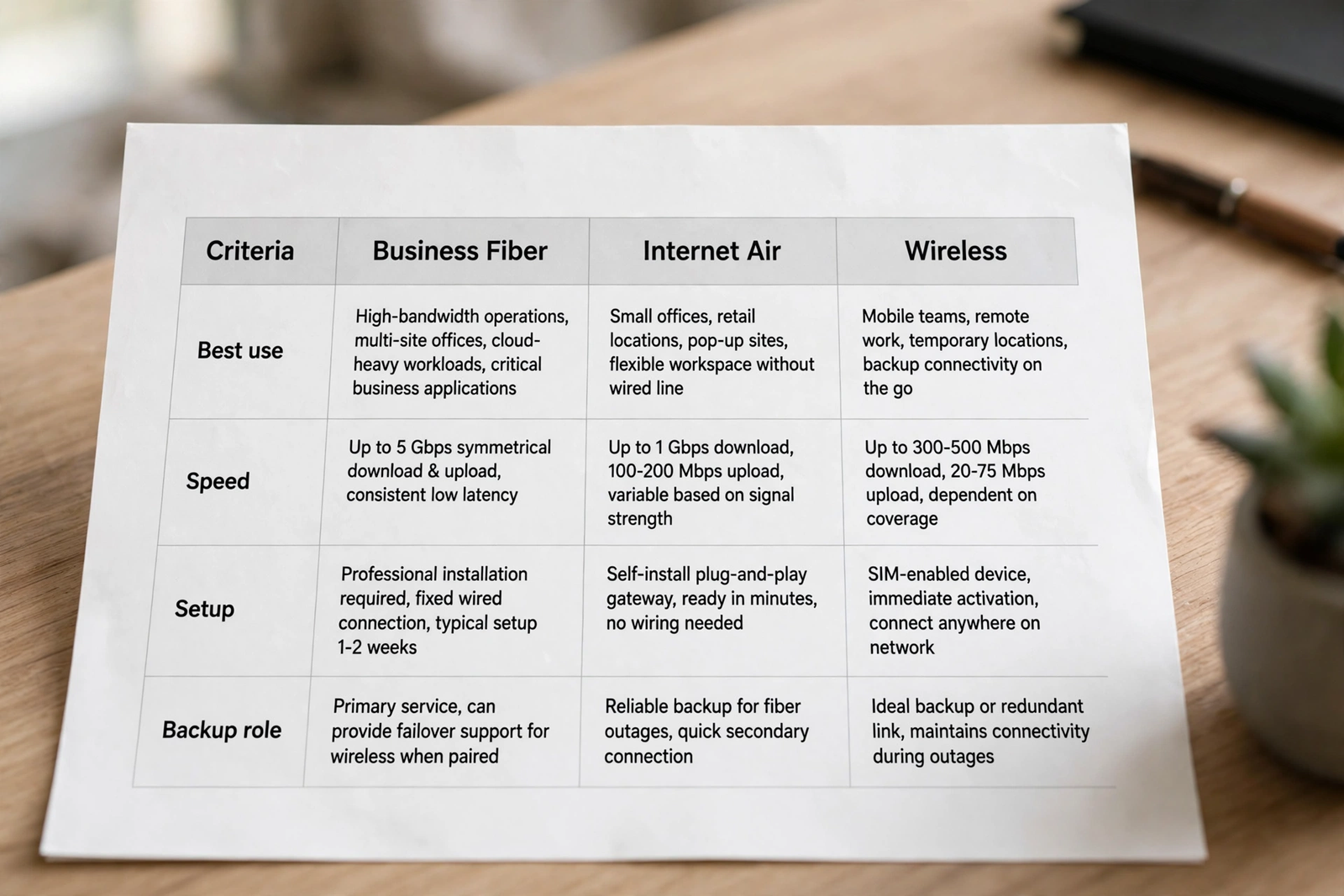
The table below summarises the comparison in a form you can scan quickly. It is intentionally simple: the right choice depends on your address, team, and daily work, and the table is a starting point for that conversation, not a final recommendation. Read the notes under it before you decide, especially the points about availability and backup.
| Product | Best for | Speed approach | Setup | Backup role |
|---|---|---|---|---|
| Fiber | Main office, shared daily use | Tiered wired service | Wired install at address | Primary connection |
| Internet Air | Fast setup, second site, backup | Fixed wireless, signal dependent | Gateway at location | Strong failover option |
| Wireless | Mobile teams, field work | Mobile network, coverage dependent | Lines and devices | Keeps people connected off-site |
Notice how the backup column changes the picture. Fiber is usually the primary connection, Internet Air is a natural failover path because it uses a different delivery method, and Wireless keeps individuals connected even if a location loses its main internet. A resilient setup often combines at least two of these roles, rather than relying on a single product for everything. That combination thinking is more useful than asking which single product is best in isolation.
Speed Approach Compared Across AT&T Business Products
Fiber speed is discussed in tiers: 300, 500, 1 GIG, 2 GIG, and 5 GIG. Those tiers give you a structured way to compare options for a fixed office, but they are not a promise about every device on your network. Your router, Wi-Fi coverage, cabling, and the number of simultaneous users all affect what people experience. When you shortlist a tier, think about peak periods, such as when everyone is on video calls at once, rather than quiet moments.
Internet Air speed is framed differently. As fixed wireless, it depends on signal and coverage at your location, so a headline comparison with a wired tier can mislead. The practical question is whether, at your address and in the room where the gateway will sit, the connection handles your essential apps reliably during working hours. If it does, it may be entirely suitable as a primary connection for a smaller location or as a backup for a larger one. If it does not, placement, coverage, or a different product may be the answer.
Wireless speed is also coverage dependent, and it varies by where the person is working, the device in use, and network conditions at that moment. That variability is acceptable for mobile work because the priority is reachability and usability on the move, not matching an office wired connection device for device. Judge Wireless on whether your team can use the apps they need, make and receive calls, and share files from the places they actually work.
Setup Compared: Installation, Equipment and Getting Started
Fiber setup is a wired installation at your address, so eligibility and the state of the premises matter. A location that already has suitable infrastructure will have a different experience from one that needs more work, and appointment and installation details should be confirmed on your order. Plan around that reality: if you have a firm opening date, check Fiber eligibility early so you are not left deciding at the last minute.
Internet Air setup centres on a gateway placed at the location. That makes it attractive when speed of deployment matters, because there is no wired build in the same sense as Fiber. Placement still matters a great deal, though. A gateway tucked away in a poor-signal spot will not perform like one placed where coverage is strongest. Take time to find the best position, test it with real work, and think about Wi-Fi coverage across the space your team uses.
Wireless setup is organised around lines and devices rather than a premises installation. You choose plans for the people who need them, set up their phones or tablets, and manage lines as staff join or leave. That model suits growing teams because you can add lines as you hire, and it suits field teams because there is no single site to equip. The administrative side matters here too: keep a simple record of lines, devices, and who holds them, so changes are easy later.
Disclaimer: This article contains affiliate links to AT&T Business services. We may earn a commission if you purchase through them, at no extra cost to you. Ortelcom.com is an independent publisher and is not affiliated with or endorsed by AT&T. Pricing, speeds, and availability are not guaranteed, were checked 2 November 2026, and vary by address and promotions — please confirm all details before ordering. AT&T and all related marks are trademarks of their respective owners.
Backup Role Compared: How Each Product Supports Business Continuity
Every business should think about what happens when its main internet fails, even briefly. A short outage during a payment, a video meeting with a client, or a cloud-based workflow can disrupt the day out of proportion to its length. The comparison therefore needs a continuity lens: which product keeps essential work going, and for which people and locations?
Internet Air is often the most straightforward backup for a Fiber office because it arrives by a different route. If the wired connection has a problem, the wireless path can keep core systems online. That does not mean every device and every task must run at full capacity during an outage; it means the business can prioritise payments, email, customer communication, and critical cloud apps until the primary connection returns. Define those priorities in advance so a failover is a plan, not a scramble.
Wireless supports continuity in a different way. Even if a whole office loses its location internet, staff with mobile devices can still communicate with customers, process work that does not depend on the office network, and coordinate a response. That individual-level resilience complements a location-level backup. Together, a backup location connection and mobile connectivity give a small business two layers of protection instead of one.
Cost and Value Compared for AT&T Business Products
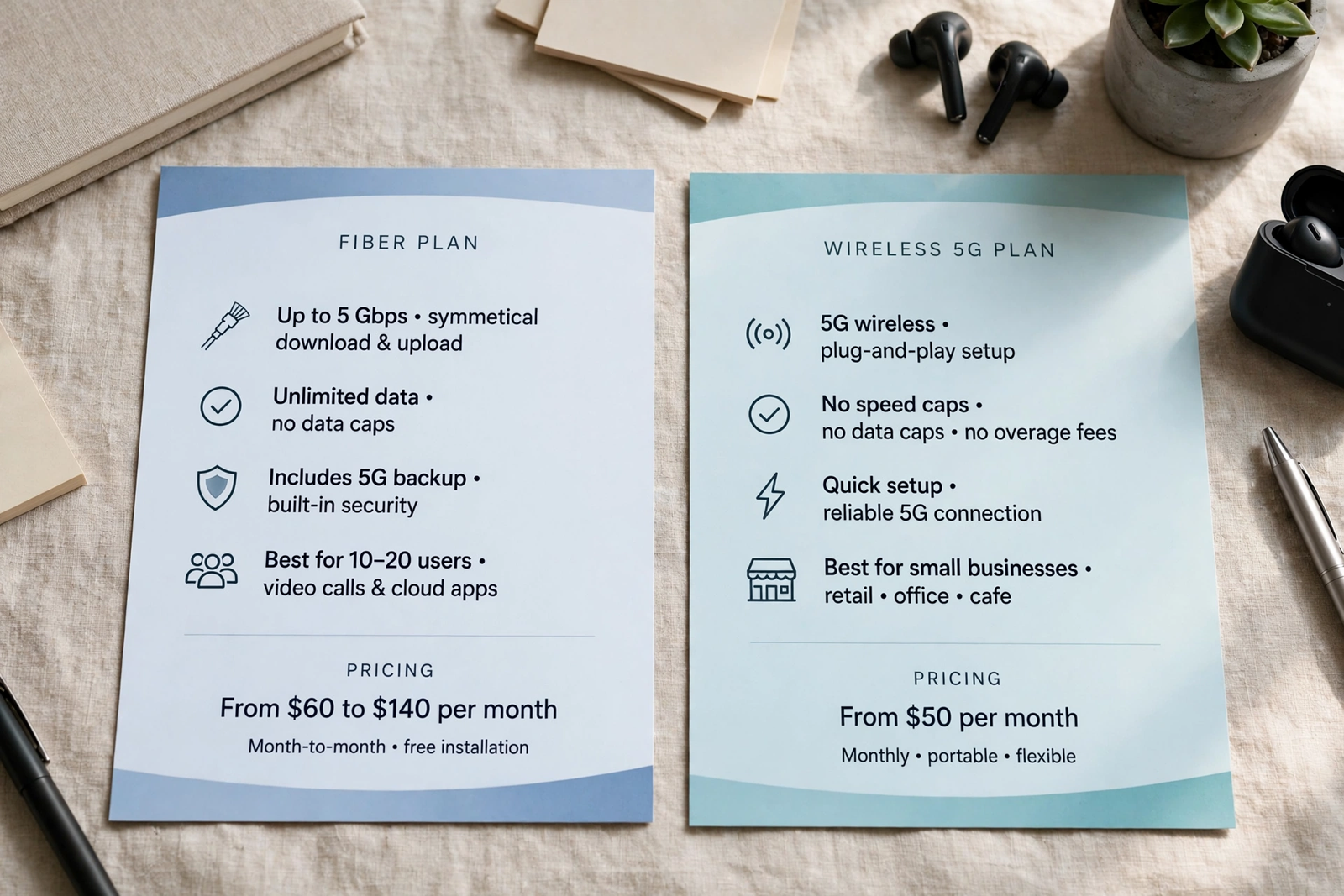
Price comparisons only work when you compare the same basis. For Fiber, the published list figures are 300 at $60, 500 at $100, 1 GIG at $140, 2 GIG at $185, and 5 GIG at $285 per month, with lower figures where an eligible wireless plan applies: $40, $60, $90, $135, and $235 respectively. Those list figures are a useful starting point, but your quote may differ by address, promotion, and eligibility, so confirm the final monthly figure and what it includes before ordering.
For Internet Air, the published list figures are Standard at $65 and Premium at $105 per month, $60 and $100 with AutoPay and paperless billing, and $40 and $80 with an eligible wireless plan. Again, confirm on your quote, because promotions and eligibility can change the figure you actually pay. When you compare Internet Air with Fiber, compare the tier or plan you would actually buy, not the cheapest figure on either list, and factor in whether the product is your primary connection or a backup.
Wireless pricing is not quoted here as a single figure because it varies by plan and by the number of lines. That is not a gap in the comparison; it is the reason a tailored quote matters for mobile plans. Ask what each plan includes, how lines are counted, and what changes when you add or remove a line. A plan that looks inexpensive for one person may not be the best value for a team, and vice versa. For the detailed Fiber figures behind this section, see AT&T Business Fiber pricing, and for Internet Air, see AT&T Internet Air for Business pricing.
Which Compared Product Combination Fits Your Business?
Most small businesses fall into a few recognisable patterns. A single-office business with a stable team usually starts with Fiber for the office and adds Wireless for staff who travel. A business with a main office and a smaller second site might use Fiber at the main site and Internet Air at the second site, avoiding a second wired build. A business opening a new location quickly might start with Internet Air and review Fiber once the site is established and eligibility is clear.
A business that cannot afford downtime, such as one taking payments all day or running time-sensitive customer service, should think in combinations from the start. Fiber plus Internet Air as backup is a common pattern for that need, with Wireless as an additional layer for key staff. The cost of a second path should be weighed against the cost of an outage, including lost sales, missed calls, and staff time spent waiting rather than working.
Do not overbuy in the name of future-proofing either. A tier or plan far above your current needs ties up monthly budget that could go to other priorities, and you can usually revisit your setup as the business grows. Start with what your team actually does today, leave room to scale, and review the setup when headcount, locations, or working patterns change materially.
Questions to Ask Before You Compare AT&T Business Plans
Before you request quotes, write down the answers to a few practical questions. How many people work at each location, and how many devices do they use at peak times? Which apps must work without interruption, and which can wait? Do staff work from home, on site, or in the field, and how often? Is there a second location, a seasonal site, or a planned move in the near future? Those answers will narrow the product list faster than any feature table.
Also ask about eligibility and constraints for each address. Is Fiber available at that address, and if so, which tiers? Is Internet Air available there, and how strong is coverage where the gateway would sit? For Wireless, how many lines do you need now, and how might that change in the next year? Getting these facts early prevents a comparison based on products you cannot actually buy at your location.
Finally, ask what is included and what is not. Confirm the monthly figure on your quote, any equipment or setup considerations, and the terms that apply to your plan. Ask how changes are handled, such as adding a line, moving premises, or changing a tier. Clear answers at this stage save renegotiation later and make the final comparison a fair one.
Common Mistakes When Business Products Are Compared Side by Side
One common mistake is comparing a location product with a mobile product as if they were interchangeable. Fiber and Internet Air can both serve a premises, so they invite direct comparison. Wireless serves people, so it should be compared with other mobile options and judged as a complement to location internet. Mixing those categories leads to a decision that looks tidy on paper but leaves a gap in practice, such as an office without location internet or a field team without mobile access.
Another mistake is choosing on price alone without checking the basis of the price. A lower monthly figure for a backup product is not comparable to the figure for a primary connection, and a mobile plan figure for one line is not comparable to a team total. Compare like with like, confirm each quote, and weigh the value of reliability and continuity alongside the monthly cost. The cheapest option that fails during a busy period is rarely the cheapest in practice.
FAQ: AT&T Business Product Comparison Questions
Which AT&T business product compared here is best for a single office?
For a single fixed office with regular shared use, Fiber is usually the first product to evaluate, where available at your address. Internet Air can be a strong alternative or backup, especially where Fiber is unavailable or fast setup matters. Confirm eligibility and pricing for your address before deciding.
Can Internet Air replace Fiber as a business product?
It can for some locations, particularly smaller sites or businesses that prioritise fast setup and flexibility, but the answer depends on signal and coverage at that premises and on how demanding your daily work is. Test Internet Air with your real apps and devices before relying on it as your only connection.
Is Wireless a substitute for Fiber or Internet Air?
No, Wireless is best understood as mobile connectivity for people, complementing location internet rather than replacing it. A busy office still needs Fiber or Internet Air for its fixed devices, while Wireless keeps field and travelling staff connected.
How should a business product comparison handle backup?
Judge backup by what keeps essential work going during an outage, not by matching every feature of the primary connection. Internet Air often serves as a failover path for a Fiber office, and Wireless adds individual-level resilience for staff away from the office.
What should I confirm before ordering a compared AT&T business product?
Confirm availability at your address, the tier or plan that fits your team, the monthly figure on your quote, what equipment is involved, and how changes such as adding lines or moving premises are handled. Pricing, speeds, and availability vary, so a quote for your situation is essential.
Final Word: Compared Products, One Practical Starting Point
The comparison comes down to a simple sequence. Secure reliable internet for each fixed location first, choosing between Fiber and Internet Air based on availability, team size, and how the location is used. Then add Wireless for the people who work beyond those locations, sized to your actual lines and devices. Finally, consider a backup path for any location where downtime would hurt, so a single failure does not stop the business.
If that sequence points to Fiber for your main office, start by checking availability and the tier that fits your team, and use the pricing figures in this guide only as a starting point for your quote. To take that next step, check AT&T Business Fiber for your business and confirm the details for your address before you order.

