
Verdict: For most small hotels, motels, and short-stay properties, AT&T Business Fiber is the best internet choice in 2026, because it delivers fast, symmetrical speeds with no data caps on a connection built for business use. Guest streaming, video calls, front-desk systems, card payments, and security cameras all compete for the same connection in a hotel, and a shared residential-style line usually shows its limits at exactly the wrong moment: check-in time, a full house on a Friday night, or a morning when every guest is streaming and showering and checking out at once. Fiber gives a small property headroom for those peaks, uploads that keep pace with downloads, and a stable foundation for the guest Wi-Fi network guests now judge almost as harshly as the rooms themselves.
That does not mean every motel needs the fastest tier on the price list, and it does not mean fiber alone fixes a bad Wi-Fi setup. A great hotel network has three parts working together: a strong internet connection coming into the building, a well-planned Wi-Fi system that reaches every room and common area, and a sensible separation between guest traffic and the systems that run the business. Get those three right and the internet stops being a complaint category and starts being a quiet reason guests come back. This guide walks through sizing, guest Wi-Fi design, payment and front-desk separation, streaming loads, cameras, seasonal peaks, pricing, and installation, so a small hotel or motel owner can choose with confidence. Pricing and features here were checked in October 2026 and vary by address, so confirm availability and current offers before ordering.
AT&T Business Fiber for Small Hotels and Motels
Check availability for your property and compare symmetrical fiber plans built for guest Wi-Fi, streaming, and front-desk systems.
What Good Internet for Small Hotels and Motels Actually Looks Like
Good hotel internet is invisible. Guests connect once, stay connected as they move from the lobby to their room, stream without buffering, and join a video call without freezing. Staff can check guests in, process cards, and print folios without the system stalling because someone upstairs started a large download. Cameras keep recording, door locks respond, and the phones keep working. Nobody writes a review praising the Wi-Fi when it simply works, but plenty of guests mention it when it does not. That asymmetry is the whole business case for investing properly in a hotel connection rather than treating internet as a utility bill to minimize.
Three qualities matter more than a single advertised download number. First, consistency under load: the connection should hold up when many guests are online at once, not just when one device runs a speed test at 2 a.m. Second, upload speed: guests back up photos, join video calls, and stream to social platforms, while the property uploads camera footage and syncs reservation data. Symmetrical fiber, where uploads match downloads, handles that two-way traffic far better than an asymmetrical connection with a small upload allowance. Third, low latency and stability: video calls, cloud property-management systems, and card terminals all suffer more from jitter and dropouts than from a modest shortfall in headline speed. A connection that is steady at a moderate speed usually feels better than a faster connection that stutters.
How Much Internet Speed Does a Small Hotel or Motel Need
There is no single correct speed for a small hotel, because room count, building construction, guest mix, and amenities all change the answer. A 12-room roadside motel with mostly overnight leisure travelers uses the network differently than a 40-room property near a conference center that hosts business travelers on video calls all day. A property with a pool, a breakfast room, and an event space has more simultaneous users than its room count alone suggests. The table below therefore frames sizing as guidance with stated assumptions, not as a guarantee: assume roughly two to three connected devices per occupied room at peak, plus staff devices, cameras, and common-area use, and size for the evening peak when guests are back in their rooms streaming.
| Property size | Typical peak picture | Planning guidance |
|---|---|---|
| Under 20 rooms | Leisure guests, evening streaming, light front-desk use | Mid-tier fiber plan; strong room-by-room Wi-Fi coverage matters more than maximum speed |
| 20 to 50 rooms | Mixed leisure and business guests, breakfast and lobby use, cameras and card payments | Gigabit-class fiber plan; separate guest and business networks; plan access points per floor |
| 50 rooms or more, or with meeting space | Events, groups, heavy simultaneous streaming and video calls | Gigabit or higher; professional Wi-Fi design and a backup connection deserve serious consideration |
Upload speed deserves its own line in any hotel sizing conversation. On an asymmetrical connection, a handful of guests on video calls or uploading video can saturate the upload path even while downloads look fine, and that shows up as frozen calls, slow photo uploads, and sluggish cloud systems. Symmetrical fiber removes that bottleneck by design. For a fuller explanation of how to think about speed for a business in general, see our guide on how much internet speed a business needs, then adjust upward for the guest-device multiplier that makes hotels different from offices. When in doubt, buy headroom: the cost difference between tiers is usually small compared with the cost of a weekend of bad reviews.
Why Fiber Internet Leads for Small Hotels and Motels
Fiber stands out for lodging for the same reasons it stands out for other demanding small businesses, only more so. It is symmetrical, so uploads keep up with downloads. It carries no data caps on AT&T Business Fiber plans, which matters when dozens of guests stream every night. It is not shared in the same way as some older cable infrastructure, so evening peak performance tends to hold up better. For a property that expects to be in business for years, that upgrade path is worth more than a small saving on a connection that will feel cramped within a season.
Availability is the honest caveat. Fiber is not yet available at every motel address, particularly in rural areas or older buildings set back from the road. If fiber is not available at your property, check what fixed-wireless or cable options exist, ask what speeds are actually delivered at peak times, and plan a backup path for payments and reservations. Do not let a single unavailable option stall the whole project: improving Wi-Fi coverage and separating guest and business traffic helps on any connection. But where fiber is available, it is the default recommendation for a small hotel or motel that wants to stop worrying about internet and start focusing on guests. You can check AT&T Business Fiber availability for your hotel and compare plans for your address.
Guest Wi-Fi and Internet Design for Hotels: Rooms, Floors, and Common Areas
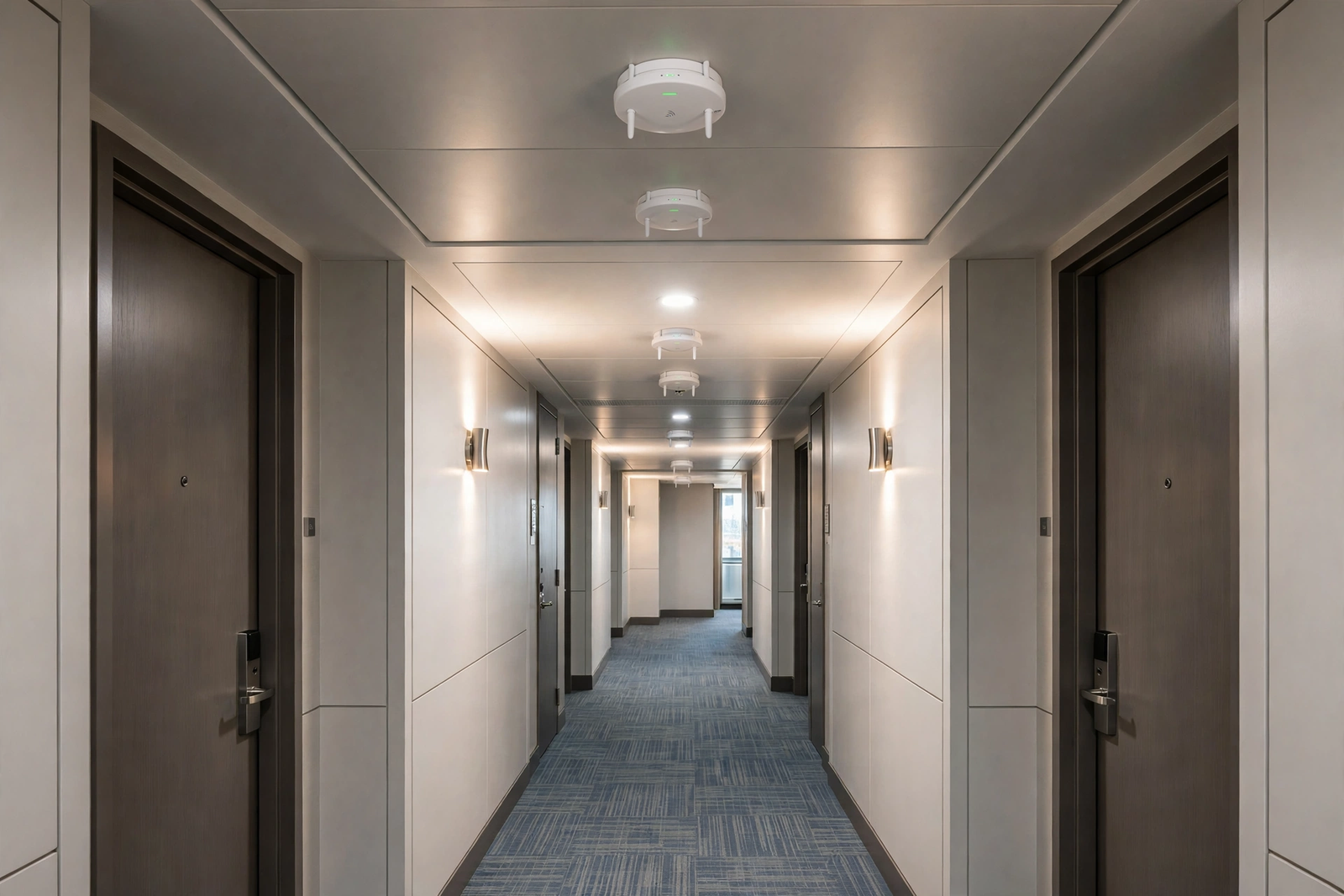
Guest Wi-Fi design starts with a floor plan, not a router box. Walk the property as a guest would: the lobby, the hallway, each room type, the breakfast area, the pool, the parking lot, and any outbuilding. Note where walls are thick, where the building turns a corner, and where metal doors or elevators might block signal. Older motels with exterior corridors and separate buildings need a different approach than a single multi-story hotel with interior hallways. In both cases, the goal is the same: a guest should be able to connect in the lobby and stay connected to the room without rejoining, dropping, or hunting for a new network name on every floor.
Guest experience details matter as much as signal bars. A simple, clearly posted network name and password, or a captive portal that asks for a room number or a simple acceptance step, reduces front-desk calls far more than any speed upgrade. Keep the sign-in process short: guests will not tolerate a multi-page form at midnight after a long drive. Consider a separate network name for staff and a separate one for guests, and keep the guest password easy to rotate if needed. For a step-by-step approach to setting up guest access, see our guide to setting up guest Wi-Fi for a business, and adapt its office-focused steps to room and floor layouts. Finally, test like a guest: stay in the farthest room, stream video, join a call, and walk the property while connected. Fix what you find before guests do.
Keeping Front-Desk Internet, PMS, and Card Payments Off the Guest Network
This is the single most important security decision in a hotel network, and it is also one of the simplest: guests should never share a network with the systems that take money and hold guest data. The front-desk computer, the property management system, card terminals, and any back-office devices belong on a separate business network, ideally on a separate virtual network segment, with its own credentials and access controls. Guest devices belong on the guest network, isolated from each other where possible and from business systems always. That separation limits what a compromised or curious guest device can reach, and it keeps a guest streaming binge from starving a card transaction of bandwidth.
Payment devices deserve special care. Connect card readers and point-of-sale terminals by wired Ethernet where possible, keep their software updated, and never let a guest device or an unknown device join the payment network. Train front-desk staff on the basics: do not share the business Wi-Fi password with guests, do not plug unknown USB devices into front-desk computers, and report anything unusual rather than working around it. Our guide to connecting POS devices and printers to business Wi-Fi covers the practical side of getting payment and office devices onto the right network. None of this replaces professional advice on payment security or data protection for your specific systems, so confirm your setup with your PMS vendor and payment provider, but separation is the foundation every other control builds on.
Disclaimer: This article contains affiliate links to AT&T Business services. We may earn a commission if you purchase through them, at no extra cost to you. Ortelcom.com is an independent publisher and is not affiliated with or endorsed by AT&T. Pricing, speeds, and availability are not guaranteed, were checked in October 2026, and vary by address and promotions — please confirm all details before ordering. AT&T and all related marks are trademarks of their respective owners.
Streaming, TV, and Guest Entertainment on Hotel Internet

Streaming is now the default evening activity in a hotel room, and it shapes peak demand more than any other single use. Guests cast from their phones, log into their own streaming accounts on the room television, or watch on a laptop while a partner watches something else. A single high-definition stream uses a steady flow of data for an hour or more, and a room with two guests streaming at once doubles that. Multiply that across a full floor at 9 p.m. and it is easy to see why a connection that felt fast in the morning can feel thin at night. Fiber’s capacity and lack of data caps are built for exactly that pattern, where many long, steady streams run in parallel.
Bandwidth management, used fairly, helps here. Rather than letting a single device monopolize the connection, many business Wi-Fi systems can share bandwidth evenly so one guest’s large download does not ruin everyone else’s evening. That is not about spying on what guests watch; it is about keeping the shared resource usable for all. Properties should also be transparent in a general sense: advertise Wi-Fi as suitable for streaming and working, if that is true for the property’s setup, and avoid promising specific speeds in a room that the network cannot reliably deliver. Honest marketing prevents the review that says the Wi-Fi was advertised as fast but buffered all night.
Cameras, Door Locks, and Hotel Security Over Business Internet
Cameras and smart locks are quiet but constant users of hotel internet, and they behave differently from guest traffic. Cameras upload video continuously, especially if footage is stored in the cloud, which makes upload speed and stability more important than download speed for that traffic. A property with a dozen cameras can generate a steady upstream load all day, and a connection with a small upload allowance will feel that load first. Symmetrical fiber handles camera uploads without competing as sharply with guest downloads, which is one more reason fiber suits properties that have invested in security systems.
Outages deserve a plan, not just hope. If the internet goes down, what happens to check-ins, card payments, door locks, and cameras? A property with a backup connection, even a modest one, can keep payments and reservations running while the main connection is repaired, and guests may never notice. Where fiber plans include built-in backup, that resilience is part of the value, and where they do not, a separate backup path is worth discussing. Document the plan, keep the provider’s support number at the front desk, and rehearse the manual check-in fallback once, so staff are not inventing it during a real outage. For broader security habits, see our guide to securing a business Wi-Fi network.
AT&T Business Fiber Pricing for Small Hotels and Motels
AT&T Business Fiber pricing, checked in October 2026, is straightforward and tiered by speed, with symmetrical uploads and no data caps at every tier. List prices are 300 Mbps at $60 per month, 500 Mbps at $100 per month, 1 GIG at $140 per month, 2 GIG at $185 per month, and 5 GIG at $285 per month. With an eligible wireless plan, those prices fall to $40, $60, $90, $135, and $235 per month respectively. There is no annual contract, and plans include ActiveArmor security features.
| AT&T Business Fiber plan | List price per month | With eligible wireless per month | Hotel fit |
|---|---|---|---|
| 300 Mbps | $60 | $40 | Very small properties with light guest streaming |
| 500 Mbps | $100 | $60 | Small properties with regular evening streaming |
| 1 GIG | $140 | $90 | Most 20 to 50 room properties; includes 5G backup |
| 2 GIG | $185 | $135 | Larger properties, events, or heavy camera loads |
| 5 GIG | $285 | $235 | Large properties or properties planning major growth |
Seasonal Peaks, Events, and Weekend Surges on Hotel Internet
Hotels do not have flat demand, and their internet should not be sized for flat demand either. Summer weekends, holiday periods, local festivals, sports tournaments, and wedding seasons can fill a property that sits half-empty in February. During those peaks, every room is occupied, the lobby is crowded, and guests are streaming, uploading photos, and working at the same time. A connection sized for the quiet season will feel inadequate precisely when the property is earning its best revenue and hosting the guests most likely to leave reviews.
Hotel Internet Installation and Setup Without Disrupting Guests
Installation planning is where a good hotel network is either built cleanly or becomes a series of compromises. Start by mapping where the fiber entry point will be, where network equipment will live, and where cables need to run to reach each floor and wing. From there, plan cable runs to access-point locations, ideally during a low-occupancy period or a renovation, and confirm who is responsible for each piece: the provider, the property’s IT helper, or an electrician for cable work that the provider does not cover.
Ongoing management is simpler than most owners fear, provided someone owns it. Assign one person, staff or contractor, to check the network monthly, apply updates, and respond to guest reports with a simple checklist rather than guesswork. Keep spare access-point hardware or a clear replacement plan, because a dead access point in a busy wing will generate complaints until it is replaced. If the property grows, adding rooms, an annex, or an event space, revisit the network design at the same time as the building work, not after guests start complaining about the new wing. Good hotel internet is not a one-time purchase; it is a system that is planned, tested, and maintained like any other part of the property.
Limitations of Hotel Internet and Fiber Connections to Know
Fiber is the strongest default for small hotels, but honesty requires naming its limits. Availability is the first: not every address can get fiber, and a property in a rural area or an older building may need to wait, use an alternative connection, or combine connections. Building construction is the second: thick concrete, metal, and long exterior corridors can defeat even a strong connection if Wi-Fi coverage is not planned for them. A property should budget for access points and cabling, not just the monthly plan price, and should be wary of any quote that promises perfect coverage from a single device.
Speed tiers are also not a guarantee of room-by-room performance. The advertised speed is the speed of the connection coming into the building, not the speed a guest will see on a phone two floors away through two walls. Guest devices vary, older phones connect more slowly, and a crowded radio environment in a dense area can affect Wi-Fi even when the fiber line itself is healthy. Finally, no connection is immune to outages: construction cuts, storms, and provider faults happen. A backup plan, whether built-in 5G backup on higher fiber tiers or a separate backup connection, is what turns an outage from a crisis into an inconvenience.
FAQ: Internet for Small Hotels and Motels
What is the best internet for small hotels and motels in 2026?
For most small hotels and motels where it is available, AT&T Business Fiber is the best choice, because it offers symmetrical speeds, no data caps, and stable peak-time performance for guest streaming, video calls, and business systems. The right tier depends on room count, amenities, and event space, so use the sizing guidance in this article as a starting point and confirm availability for your address. Where fiber is unavailable, choose the strongest fixed alternative available and invest equally in Wi-Fi coverage and network separation.
How fast should hotel internet be for guests streaming in every room?
Rather than promising a per-room figure, plan for the evening peak: most occupied rooms with two or three devices each, several guests streaming at once, plus staff systems and cameras. That peak is why mid-tier fiber suits very small properties while gigabit-class fiber suits most properties with 20 to 50 rooms. Test streaming in the farthest rooms during a busy evening, because that test tells you more than any single speed-test number run at the front desk.
Should guests and staff share the same hotel internet network?
No. Guests should use a guest network, while front-desk systems, the property management system, card terminals, cameras, and locks should use a separate business network. Separation protects payment and guest data, keeps guest streaming from starving card transactions, and limits what a compromised guest device can reach. Keep the business network password private to staff and never share it with guests as a workaround.
Does AT&T Business Fiber include backup internet for a hotel?
AT&T Business Fiber plans at 1 GIG and above include built-in 5G backup, checked in October 2026. That backup helps keep payments, reservations, and basic operations running if the fiber connection fails. Smaller tiers do not include that built-in backup, so a property on a lower tier that cannot tolerate downtime should discuss a separate backup option. Always confirm current backup terms for your plan and address before ordering.
Can a small motel upgrade its hotel internet later as it grows?
Yes. Fiber plans can generally be upgraded to a higher tier as occupancy, amenities, or guest expectations grow, and the Wi-Fi system can be expanded with additional access points when rooms or event space are added. Plan cable runs and equipment space with growth in mind, so an upgrade means changing a plan or adding an access point rather than rewiring the building. Confirm upgrade terms with the provider for your address.
Final Hotel Internet Checklist Before You Order
Before ordering, walk the property, count rooms and common areas, and list the systems that must never go down: reservations, payments, phones, and locks. Choose a fiber tier sized for a full house at peak, plan separate guest and business networks with wired access points for each floor and wing, and arrange a backup path for outages. Then confirm pricing and availability for your exact address.

