
So, which AT&T business product should you buy first? For most small businesses, the answer starts with reliable internet at your main location, then adds mobile connectivity for the people who work away from that location, and finally adds a backup path where downtime would hurt. That order works because it secures the place where most work happens before it equips people on the move, and it treats backup as a deliberate second step rather than an afterthought.
This decision guide turns that general order into a practical framework you can apply to your own business. It walks through address eligibility, team size, mobility needs, budget, and backup, with a simple decision table to help you see where you fit. It frames every recommendation as start-here-if guidance, not as a guarantee, because availability, coverage, and pricing vary by address, plan, and lines. Confirm the details on your quote before you order.
Start With AT&T Business Fiber for Your Main Office
Check Fiber availability for your business address and find the tier that fits your team.
Which AT&T Business Product to Buy First: The Short Decision Answer
If you have one main office and a team that works there most days, buy location internet first. In practice that usually means evaluating Fiber first where it is available, or Internet Air where Fiber is not available, where fast setup matters, or where you need a second site online quickly. Once that location connection is settled, add Wireless for staff who travel, visit customers, or work in the field. That sequence avoids the most common error: equipping mobile devices before the office itself has a dependable connection.
There are sensible exceptions to that order, and the rest of this guide helps you spot them. A business with no fixed office, or with a team that is almost entirely mobile, may reasonably put Wireless first. A business opening a new site in a hurry may put Internet Air first for that site while Fiber eligibility is checked. A business that already has location internet may find that its real first purchase is a backup path, not a new primary product. The framework below lets you test which exception, if any, applies to you.
Think of the decision as a priority list, not a single purchase. You are deciding what to secure first, what to add next, and what can wait until headcount, locations, or working patterns change. That mindset also helps with budgeting, because it spreads decisions over time instead of forcing everything into one order. If you want background on choosing location internet in general, read how to choose business internet before you work through the questions that follow.
Buy First Decision: Check Address Eligibility Before Anything Else
Eligibility is the first filter in any buy-first decision because it determines what you can actually buy. Fiber availability depends on your address, and the tiers available can vary. Internet Air availability depends on coverage at that location. Wireless availability depends on mobile coverage where your people work. Checking these facts early prevents a plan built around a product that is not available where you need it.
Start with your main location, then repeat the check for any second site, seasonal location, or planned move. A product that is right for headquarters may not be available at a branch, and a mobile plan that works in one area may be less suitable where field staff spend most of their time. Write down what is available at each address so the rest of the decision rests on facts, not assumptions.
If Fiber is available at your main office, it usually becomes the leading candidate for that location, and you can then compare tiers by team size and daily work. If Fiber is not available there, Internet Air becomes the location candidate to test, with careful attention to signal and placement. If neither location option works well at a particular site, that site needs a different conversation, and you should not force a product into a role it cannot fill.
Team Size and the First Product Decision Guide
Team size shapes the first purchase because it shapes demand. A one- or two-person business with routine office work, email, and occasional video calls has different needs from a twenty-person office where everyone is online at once, sharing files and joining meetings throughout the day. Count people, count devices, and think about peak use, not just average use. The busiest hour is the hour your connection must handle.
For a small fixed team, the decision may be straightforward: a lower Fiber tier or Internet Air, depending on availability, plus Wireless only for the people who genuinely travel. For a larger fixed team, the location connection becomes more important, and the tier discussion matters more, because a connection that copes on a quiet morning may struggle when the whole team is active. Do not let a single-person price or a single-device test stand in for a whole-team assessment.
Team size also affects Wireless decisions. A business with two mobile staff needs a different line setup from a business with twenty. Count current lines, allow for near-term hiring if you expect it, and think about who actually needs a mobile line versus who works almost entirely at a desk with location internet. That count keeps the Wireless part of the order proportionate to real need.
Mobility Needs: When Wireless Moves Up Your Buy First List
Mobility is the factor that can legitimately move Wireless to the front of the queue. If your team spends most of its working time away from a fixed office, visiting customers, working on sites, or travelling between locations, then mobile connectivity is not an add-on; it is the core tool. In that case, buying Wireless first makes sense, and location internet becomes the next priority for any office, depot, or home base you do use.
Be honest about how mobile your team really is. Occasional travel, a weekly site visit, or working from home one day a week does not usually justify putting Wireless ahead of office internet. Daily field work, regular customer visits, and delivery or service routes do. Ask each role, not just the business as a whole: who leaves the building every day, who needs mobile access to do their job, and what happens if they cannot connect while out?
Hybrid teams need a blended order. Secure location internet for the office, then add Wireless for the mobile roles, rather than buying the same mobile setup for everyone. That targeted approach keeps costs aligned with use and avoids paying for mobility that desk-based staff will rarely use. Review the split when roles change, because a team that becomes more mobile over time will need its product order revisited too.
Budget and the Business Decision Guide to First Purchase Cost
Budget should inform the order, but it should not override eligibility or need. Start by separating the cost of your primary location connection from the cost of mobile lines and from any backup path, so you can see each part clearly. A single combined monthly figure hides the trade-offs, whereas separate figures let you decide what to buy now and what to phase in next.
For Fiber, the published list figures are 300 at $60, 500 at $100, 1 GIG at $140, 2 GIG at $185, and 5 GIG at $285 per month, with $40, $60, $90, $135, and $235 respectively where an eligible wireless plan applies. For Internet Air, Standard is $65 and Premium is $105 per month on the list, $60 and $100 with AutoPay and paperless billing, and $40 and $80 with an eligible wireless plan. Use those figures only as a starting point and confirm your quote, because promotions, address, and eligibility can change what you pay.
Wireless pricing varies by plan and lines, so confirm on your quote rather than budgeting from a generic figure. Ask how the total changes as lines are added or removed, and what each plan includes for the people who will use it. If budget is tight, phase the purchase: secure the location connection first, add mobile lines for the most mobile roles next, and add backup or additional lines when the budget or the need grows.
Backup Needs in Your First Product Decision
Backup is often treated as something to buy later, but for some businesses it should influence the first purchase. If your business takes payments all day, runs time-sensitive customer service, or depends on cloud systems that cannot pause, then a single connection is a risk even if it is a strong one. In that case, your first decision is not just which primary product to buy, but whether to plan a second path from the start.
Internet Air often fills that backup role for a Fiber office because it arrives by a different route. That does not mean you must buy both on day one, but it does mean you should decide early whether backup is a phase-two purchase or a day-one requirement. If downtime would cost sales, miss customer commitments, or leave staff idle, treat backup as part of the first decision, not as an optional extra to revisit someday.
Wireless adds a different kind of backup: individual resilience. Even if a location loses its main internet, staff with mobile devices can still communicate, coordinate, and handle work that does not depend on the office network. That layer does not replace a location backup, but it softens the impact of an outage. Weigh both layers when you decide what to buy first and what to add next.
Disclaimer: This article contains affiliate links to AT&T Business services. We may earn a commission if you purchase through them, at no extra cost to you. Ortelcom.com is an independent publisher and is not affiliated with or endorsed by AT&T. Pricing, speeds, and availability are not guaranteed, were checked 2 November 2026, and vary by address and promotions — please confirm all details before ordering. AT&T and all related marks are trademarks of their respective owners.
Fiber or Internet Air or Wireless First: A Simple Decision Table
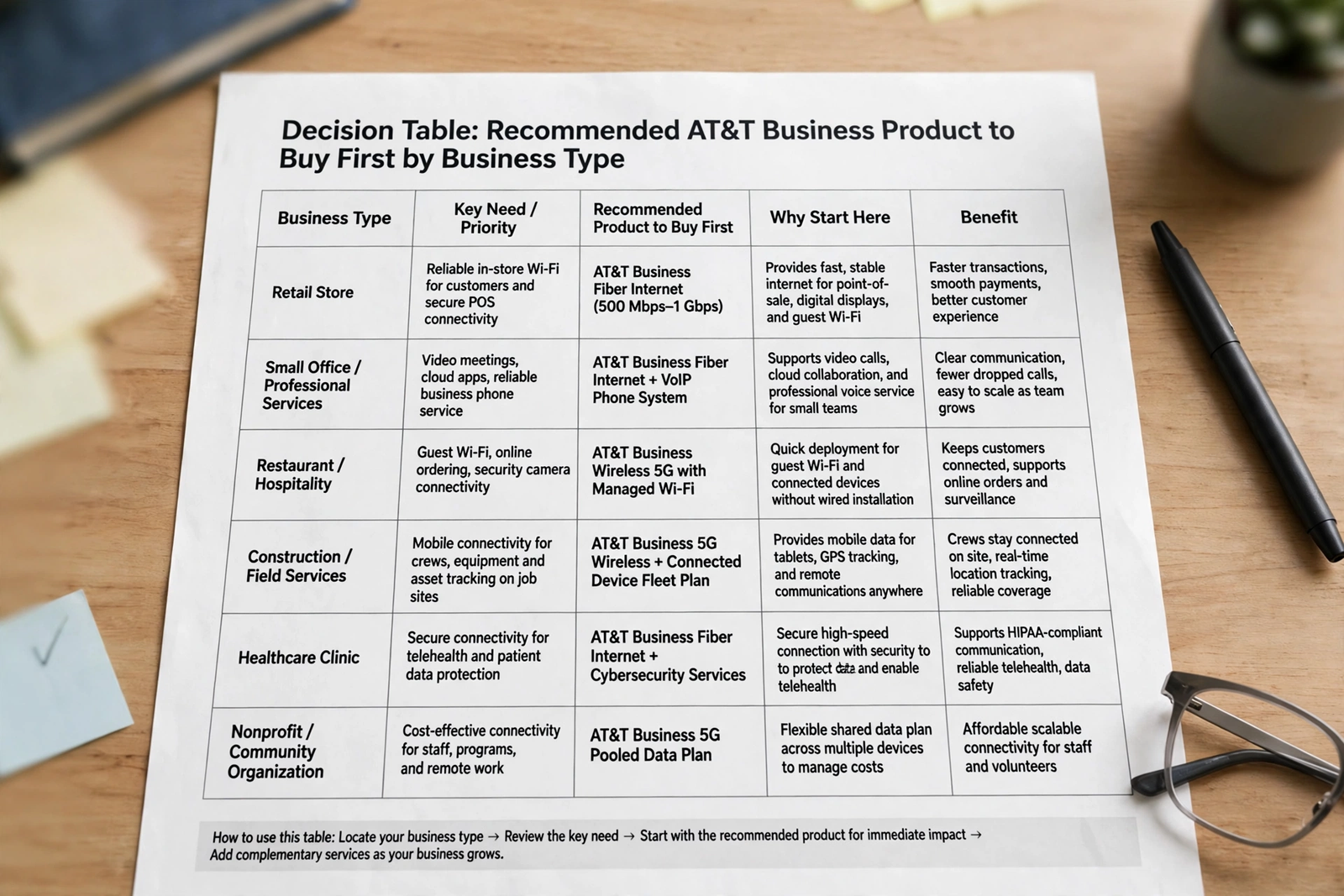
The table below turns the framework into a quick start-here-if guide. Find the row that most closely matches your situation, then read the rest of the guide to test whether that row really fits. The table is guidance, not a guarantee, and availability at your address always comes first.
| If this is you | Buy first | Add next |
|---|---|---|
| Fixed office team | Fiber, or Internet Air if Fiber unavailable | Wireless for mobile staff |
| Mostly mobile team | Wireless | Location internet for base |
| New or second site, fast setup | Internet Air | Fiber review, Wireless as needed |
| Downtime-sensitive business | Fiber plus backup plan | Internet Air backup, Wireless |
If none of the rows fits neatly, your business probably spans two rows, such as a fixed office plus a mobile team, or a main site plus a fast-moving second site. In that case, apply the framework location by location and role by role, rather than forcing a single first purchase for the whole business. A decision that is right for headquarters may not be right for a branch, and a decision that is right for office staff may not be right for field staff. For the direct location comparison behind the first row, see AT&T Business Fiber vs Internet Air.
Product Order for Common Business Types: A Decision Guide

A single-office professional business, such as an accountancy, consultancy, or design studio, usually follows the standard order: location internet first, Wireless for travelling staff next. The location connection carries video calls, cloud files, and client work, while mobile lines serve the minority who regularly leave the office. Backup becomes more important as client deadlines and payment work grow.
A retail or hospitality business with a fixed premises and payment systems also starts with location internet, but backup deserves earlier attention because a payment outage directly affects customers. Internet Air as a second path can be worth planning alongside the primary connection, even if it is phased in shortly after rather than on the same day. Wireless then serves managers and staff who work across sites or handle deliveries.
A field-service, trades, or delivery business reverses the emphasis. Wireless often comes first because the work happens on the move, and location internet follows for the office, depot, or workshop where admin, scheduling, and invoicing happen. That order reflects where revenue is actually earned during the day. Review it if the business opens a larger fixed site, at which point location internet may move up the list.
AT&T Product Order When You Buy a Fiber and Wireless Bundle
Some businesses consider Fiber and Wireless together rather than in sequence, and that bundle thinking can be sensible when both needs are clear from the start. If you know you need a fixed office connection and several mobile lines, planning them together lets you think about the combined monthly cost, the eligible wireless pricing that may apply to Fiber, and how lines and tiers fit together. It does not change the priority logic: the office still needs its connection, and the team still needs its lines.
Bundle planning also helps avoid a fragmented setup where the office connection and mobile lines are chosen in isolation and then prove awkward to manage together. Keep a single record of tiers, lines, devices, and account details, and review the bundle when headcount or locations change. For more on combining the two, see AT&T Fiber and Wireless bundle, and treat that background as a complement to a quote for your specific lines and address.
Do not let bundle convenience push you into buying more than you need on day one. If only part of the team is mobile, start with lines for those roles and add more later. If a second location is not yet open, do not buy its connection months early. A bundle is a planning approach, not a requirement to buy everything at once.
Buying Checklist Decision: Questions Before You Buy First
Before you place an order, run through a short checklist. What is available at each address you need to serve? How many people and devices will share each location connection at peak times? Who works away from the office, and how often? What would an outage cost you in lost sales, missed calls, or idle staff time? What is the monthly figure on your quote for each product, and how does it change if you add a line or change a tier?
Also check practical details that are easy to overlook. Where would Internet Air equipment sit for the best signal, if you choose that route? How is Wi-Fi coverage across the space your team actually uses? Who manages lines, devices, and account changes as staff join or leave? Answering those questions now prevents a first purchase that works on paper but frustrates the team in practice. For a fuller pre-purchase list, use the business internet buying checklist alongside this guide.
Finally, set a review point. A first purchase is not a permanent decision. Note when you will revisit it: after a hiring round, after opening a new site, after a move, or after a change in how the team works. That review habit keeps the product order aligned with the business, rather than letting an early choice linger long after it stopped fitting.
Mistakes in the Buy First Decision for AT&T Business Products
A frequent mistake is buying for the business you wish you had, rather than the business you run today. An oversized tier or a full set of mobile lines for a team that is mostly desk-based ties up budget without improving daily work. Start with current demand, leave room to scale, and expand when headcount or workload actually grows. The reverse mistake is also common: buying the smallest option to save money, then discovering it struggles at peak times. Match the purchase to peak use, not to the quietest hour.
Another mistake is skipping the eligibility and coverage checks and ordering on the basis of a general recommendation. Availability, signal, and pricing vary, so a product that is ideal for another business may not be available or suitable at your address. Check first, test where you can, and confirm the quote. That discipline takes a little time up front and saves far more time later.
A third mistake is treating the first purchase as the final setup. Businesses change, teams grow, locations open and close, and working patterns shift. The buy-first decision is best understood as the first step in a sequence, with backup, additional lines, and second sites added as needs become clear. Plan the sequence, even if you only buy the first step today.
FAQ: Which AT&T Business Product Buy First Questions
Which AT&T business product should I buy first for a small office?
Start with location internet for the office, usually Fiber where available, or Internet Air where Fiber is unavailable or fast setup matters. Then add Wireless for staff who travel or work in the field. Confirm availability and pricing for your address before ordering.
Should I buy Wireless first if my team works in the field?
Yes, that is a sensible exception. If most of your team works away from a fixed office, Wireless may reasonably come first, with location internet added next for your office or base. Judge mobility role by role, not for the business as a whole.
Is Internet Air a good first product for a new business location?
It can be, especially where fast setup matters or Fiber is not yet available at that address. Test signal and placement with your real apps before relying on it as the only connection, and review Fiber once the site is established.
How does budget affect the buy first decision?
Budget affects phasing more than priority. Secure the most essential connection first, add mobile lines for the most mobile roles next, and phase in backup or extra lines as budget allows. Confirm each figure on your quote, since Wireless pricing varies by plan and lines.
When should backup be part of the first product decision?
When downtime would directly cost sales, miss customer commitments, or leave staff unable to work. In that case, plan a backup path, often Internet Air alongside Fiber, as part of the first decision, even if the second path is added shortly after the first.
Final Word: Buy First With Confidence, Then Build Your Product Order
Your first purchase should solve your most pressing connectivity need, not every possible need at once. For most businesses that means a dependable connection for the main location, followed by mobile connectivity for people on the move, and a backup path where downtime would hurt. For mobile-first businesses, the order reverses, and for fast-moving new sites, Internet Air may lead. The framework in this guide helps you tell which pattern fits you, without pretending that one order fits everyone.
Use the checklist, confirm eligibility and your quote, and set a review point for the next step. If Fiber is the right first step for your main office, start there and build outward from a solid base. To take that step, check AT&T Business Fiber for your business and confirm availability, tier, and pricing for your address before you order.

